 11
11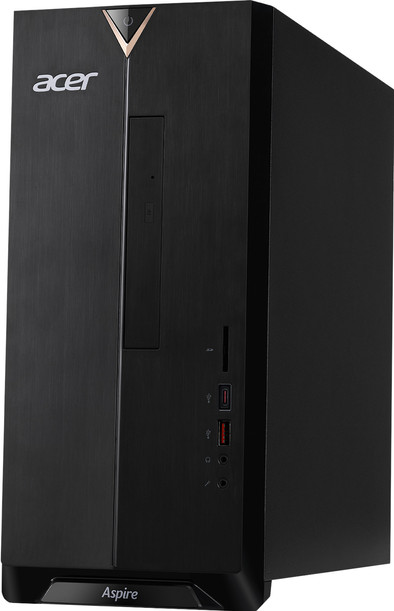


The Acer Aspire TC-885-ACCFLi5O is a mid-range consumer desktop built around Intel’s 8th-generation platform. Originally positioned as an affordable yet capable family and office PC, it combines a six-core Intel processor, large storage capacity, and Intel Optane memory acceleration.
But in 2026, does it still make sense to buy? And who is it really for?
In this in-depth review, we’ll cover:
Full specifications and hardware breakdown
Real-world performance analysis
Upgrade potential
Gaming capability
Connectivity and expansion
Pros and cons
Final verdict
Let’s dive in.
Here’s what the Acer Aspire TC-885-ACCFLi5O typically includes:
Processor: Intel Core i5-8400 (6 cores, 6 threads, up to 4.0 GHz)
Graphics: Intel UHD Graphics 630
Memory: 8GB DDR4 RAM
Storage: 2TB 7200 RPM HDD
Acceleration: 16GB Intel Optane Memory
Operating System: Windows 10 Home (upgradeable to Windows 11 in some configurations)
Optical Drive: 8X DVD-RW
Networking: 802.11ac Wi-Fi + Bluetooth 5.0
Ports: USB-C, USB 3.1, USB 2.0, HDMI, VGA, Ethernet, SD card reader
At launch, this was considered a strong value configuration — especially with Optane included.
The Aspire TC-885 follows a traditional black mid-tower design. There’s no RGB lighting or gamer aesthetic here — just a clean, understated office-friendly look.
The front panel includes:
Optical drive
SD card reader
USB ports
Audio jacks
The rear panel provides additional USB ports, HDMI, VGA, Ethernet, and audio connections.
The chassis is lightweight but functional. It’s not premium aluminum — it’s steel and plastic — but it’s sturdy enough for home and office use.
One advantage is easy internal access. The side panel removes easily, allowing you to:
Add more RAM
Install a graphics card
Replace the hard drive
Add an SSD
For a budget desktop, expandability is a major plus.
The Intel Core i5-8400 was one of Intel’s best mainstream CPUs of its generation. With 6 physical cores (not just hyper-threaded cores), it still holds up surprisingly well for everyday tasks.
For typical use cases such as:
Web browsing with multiple tabs
Microsoft Office work
Zoom or Teams meetings
Streaming Netflix or YouTube
Light photo editing
The system feels responsive — especially thanks to Optane acceleration.
Boot times are faster than a standard HDD system, and frequently used applications load quicker after a few uses due to caching.
With 8GB RAM, moderate multitasking is comfortable. However, in 2026 standards, 16GB is preferable. If you plan heavy multitasking, upgrading RAM is highly recommended.
Still, for home users, students, and small business setups, performance remains respectable.
This model includes:
2TB mechanical hard drive
16GB Intel Optane Memory module
Optane works as a smart cache, storing frequently accessed files and speeding up boot times and program launches.
Massive storage capacity (great for photos, videos, and documents)
Faster performance than a standard HDD alone
Affordable compared to full SSD systems
Not as fast as a true SSD
Large file transfers still limited by HDD speed
In 2026, many users prefer replacing the HDD with a SATA or NVMe SSD. If you install a 1TB SSD, performance dramatically improves — making this PC feel modern again.
The system relies on Intel UHD Graphics 630 integrated graphics.
Older games (CS:GO, League of Legends)
Minecraft
Light esports titles on low settings
4K video playback
Modern AAA games
High-end 3D rendering
Advanced video editing
If you want to turn this into a budget gaming PC, you can install a low-power GPU like a GTX 1650 (power supply limits must be checked). This significantly boosts gaming capability.
Out of the box, however, this is not a gaming desktop.
Connectivity is one of the Aspire TC-885’s strengths.
You get:
USB-C support
Multiple USB 3.1 ports
HDMI + VGA (great for dual monitors)
Gigabit Ethernet
Wi-Fi 802.11ac
Bluetooth 5.0
SD card reader
For office users or content creators transferring photos from cameras, the SD reader is a useful addition.
Dual display support makes it excellent for productivity setups.
Thanks to integrated graphics and a mid-range CPU, power consumption remains moderate.
The system is generally quiet during:
Web browsing
Office work
Streaming
Under heavy CPU load, the fan becomes audible but not disruptive.
Because there’s no high-powered GPU inside, thermal output is manageable.
One reason this desktop remains attractive is its upgrade flexibility.
You can upgrade:
RAM (up to 32GB depending on motherboard revision)
Add SSD (SATA or M.2 depending on configuration)
Install entry-level GPU
Replace Wi-Fi card
With a RAM + SSD upgrade, this machine can feel nearly new again.
For budget buyers willing to upgrade gradually, this is a strong selling point.
Students
Home office workers
Small businesses
Families needing shared PC
Users needing large storage space
Hardcore gamers
Professional video editors
3D designers
Users wanting ultra-fast SSD performance out of the box
Across various retailer reviews over the years, users consistently praise:
Strong value for money
Reliable performance for office tasks
Large storage capacity
Quiet operation
Common complaints include:
Slow performance compared to SSD systems
Limited gaming performance
Occasional Wi-Fi stability issues
Basic build materials
Overall ratings historically averaged above 4/5 stars, especially when purchased at a discounted price.
✔ Solid 6-core processor
✔ Massive 2TB storage
✔ Optane improves responsiveness
✔ Good port selection
✔ Upgrade friendly
✔ Quiet operation
✖ No dedicated graphics
✖ HDD slower than SSD systems
✖ 8GB RAM is minimal in 2026
✖ Basic chassis materials
The Acer Aspire TC-885-ACCFLi5O remains a practical desktop for everyday computing — especially if found at a discounted or refurbished price.
Its strengths lie in:
Reliable 6-core CPU
Large storage capacity
Expandability
Affordable pricing
However, if you expect:
High-end gaming
Ultra-fast SSD speeds
Creative workstation performance
You may want to look at newer systems.
If you need a dependable home or office desktop and plan to upgrade to an SSD later, this model still offers solid value.
If you want cutting-edge performance out of the box, consider a newer generation system.