 11
11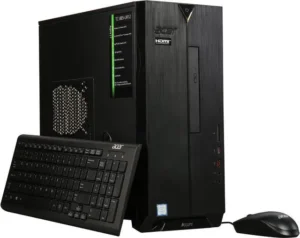 https://computeralltech.com/acer-predator-helios-300/
By Kevin Obonyo – February 12, 2026
The Acer Aspire TC-885 Review shows why this desktop remains one of the best budget PCs in 2026…Acer Aspire TC-885 Review (2026): Specs, Performance & Honest Verdict. Full specs, performance test, gaming capability, pros and cons, and comparison with competitors.If you’re looking for a solid, no‑nonsense desktop PC that handles everyday computing tasks with ease, the Acer Aspire TC‑885 should be on your radar.
This desktop strikes a compelling balance between performance, expandability and value, making it ideal for home users, students, and small offices alike. With various configurations, the TC‑885 delivers reliable performance for productivity, multimedia, and general usage — all without breaking the bank.
In this Acer Aspire TC-885 Review, we explore its specs, real-world performance, and whether it is still worth buying in 2026.
In this in‑depth review, we’ll explore the design, specifications, performance, connectivity, real‑world usage, strengths, weaknesses, and how it compares to other desktops in its class.
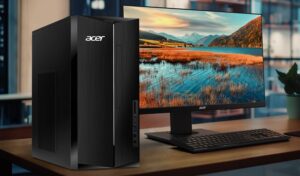
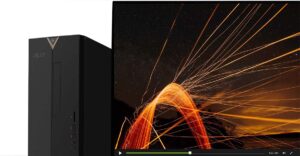
The Acer Aspire TC‑885 comes in a mid‑tower form factor with dimensions of roughly 13.39 x 6.42 x 13.78 inches, making it versatile enough to fit into most desk setups without dominating space. It’s built from black painted steel and plastic, offering a clean, understated aesthetic that blends into home offices or study areas.
Unlike many basic desktops, Acer has refreshed the TC‑885’s design over earlier models. The new look includes an illuminated V‑shaped LED around the power button, a silver Acer badge, and a subtle silver trim that runs the length of the front panel. The inclusion of an optical drive — a rarity in modern desktops — adds both functionality and a touch of nostalgia.
The case isn’t just about looks: it’s also functional. There’s room for future upgrades with available PCIe slots and mounting space for additional storage devices — an important consideration for users planning to expand their system over time.
One of the strengths of the TC‑885 series is its multiple configuration options, which range from entry‑level Core i3 systems to more robust Core i5 and even Core i7 variants depending on your needs and budget. Below is a broad look at common configur
Acer Aspire TC-885 Review: Full Specifications
(entry/mid tier):
Processor: Intel Core i3‑9100 (up to 4.2GHz) — quad‑core CPU
Memory: 8GB DDR4 RAM
Storage: 256–512GB SSD or 1TB HDD
Graphics: Integrated Intel UHD Graphics 630 http://www.intel.com
Connectivity: Wi‑Fi 802.11ac, Bluetooth 5.0, Gigabit Ethernet
Ports: USB‑C, USB‑A 3.1/2.0, HDMI, VGA, Audio jacks
Optical Drive: DVD‑RW included
OS: Windows 10/11 Home pre‑installed
Source: Acer Aspire TC‑885 manuals/spec listings and retailer specs.
Some configurations take the performance a step further: for example, Core i5‑8400 systems include six cores and higher multi‑threaded performance, while Core i7 models deliver even more processing headroom for demanding tasks like media creation or light content editing.
These variants make the Aspire TC‑885 accessible to a wide range of users — from casual web surfers to those who need extra grunt for heavier duties.
Acer Aspire TC-885 Review: Performance Test: Specs, Performance & Honest Verdict
varies based on the configuration. In general:
Core i3 models deliver smooth, dependable performance in everyday tasks such as web browsing, document editing, video calling, and multimedia playback.
Geekbench benchmarks show respectable single‑core and multi‑core scores for the Core i5‑8400 configurations, illustrating that this system handles multitasking and productivity workloads with ease.
For example, a TC‑885 with an i5‑8400 measured a single‑core score of 1360 and a multi‑core score of 3955 on Geekbench 6 — figures that reflect solid mid‑range performance for typical desktop workflows.
Remember, these scores are not meant to compete with high‑end desktops, but they certainly outperform many entry‑level PCs and offer a noticeable step up in multi‑core processing power.
Most entry models ship with 8GB of DDR4 RAM, which is adequate for multitasking and everyday use. For users planning heavier workloads — such as complex spreadsheets, larger datasets, or multimedia editing — upgrading to 16GB or more can yield measurable benefits.
On the storage front, SSD variants provide much faster boot and load times compared to traditional spinning hard drives. While some TC‑885 configurations ship with 1TB HDDs, the inclusion of SSD options — and even the availability of multiple M.2 slots — means storage can be tailored for both performance and capacity.
Graphics are handled by Intel UHD Graphics 630 in most configurations. This integrated GPU supports everyday media playback, streaming video, and light photo editing without issue — but it isn’t designed for modern gaming or demanding 3D content creation.
For users interested in basic gaming or enhanced graphics performance, some owners have successfully installed dedicated graphics cards like a GTX 1660 Super — but this is dependent on power supply capacity and physical space inside the chassis.
One of the TC‑885’s standout features is its excellent selection of ports, especially considering its price segment.
Front Panel:
USB‑C (USB 3.1 Gen2) — fast data transfers
USB‑A 3.1
Audio jacks
SD card reader
DVD‑RW optical drive
Rear Panel:
Multiple USB‑A 3.1 and 2.0 ports
HDMI (x2) for multiple monitor support
VGA for legacy displays
Gigabit Ethernet
Wi‑Fi 802.11ac & Bluetooth 5.0
This diverse connectivity suite makes the TC‑885 versatile for everything from dual‑monitor setups and high‑speed data transfer to legacy peripherals.
Expandability:
Internally, the TC‑885 offers room for upgrades such as additional RAM, secondary storage drives, and even dedicated graphics cards if your workflow demands it — though the power supply unit (typically around 300W) and physical dimensions may limit how high you can go without careful planning.
In everyday scenarios, the Aspire TC‑885 excels. Whether you’re juggling web tabs, writing documents, preparing presentations, or attending online meetings, the system delivers responsive performance with minimal delays. Boot times on SSD‑equipped models are snappy, and app launches feel smooth.
Streaming 4K or 1080p content from services like YouTube, Netflix or Prime Video is effortless. Video playback is smooth, and integrated graphics capably handle most codecs used in popular media platforms.
For basic photo editing and content creation, the TC‑885 is capable as long as the tasks aren’t overly demanding. However, once workloads grow — such as large video editing timelines, heavy layered graphics, or AI‑driven features — the performance gap becomes noticeable. Many owners of older TC‑885 systems report slowdowns when running heavier creative suites, suggesting that users consider more powerful configurations for these uses.
Out of the box, gaming isn’t this PC’s strong suit due to its integrated graphics. Casual titles and older games at low settings are fine, but modern AAA games will struggle. However, some users have upgraded their systems with dedicated GPUs to unlock playable performance — although doing so requires careful power and cooling considerations.
| Pros | Cons |
|---|---|
| Excellent value for the price | Integrated graphics limit gaming/3D performance |
| Strong connectivity (USB‑C, HDMI, multi‑USB) | PSU limits heavy expansion |
| Compact, practical design with optical drive | Some configurations may feel under powered for creative workloads |
| Expandable chassis | Wired keyboard/mouse included are basic |
| SSD options boost everyday responsiveness | Not targeted at high‑end users |
The Acer Aspire TC‑885 remains a solid performer in the budget/mid‑range desktop market in 2026. Its combination of dependable performance, useful connectivity, and upgrade paths make it a compelling choice for home users, students, and small offices looking for a dependable “everyday” PC. While not built for high‑end gaming or intense creative work, the TC‑885 meets the needs of most typical computing tasks with aplomb.
If you’re upgrading from an older system or buying your first desktop, this machine is worth serious consideration — especially in SSD‑equipped configurations. With thoughtful customization and occasional upgrades, it can remain a capable desktop for years to come.
Final Rating: ⭐★★★☆ (4/5) — A highly capable everyday desktop that’s budget‑friendly and versatile, but with limitations for high‑end tasks.