 11
11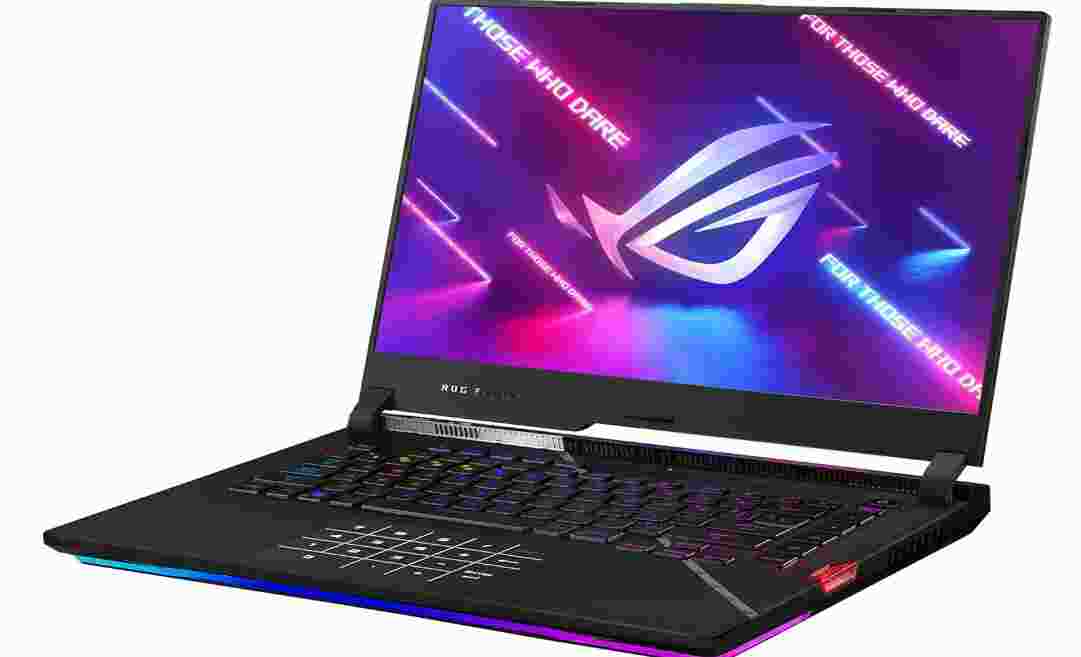
G533ZW-AS94 | Intel Core i9-12900H + RTX 3070 Ti | 1080p 300Hz | 16GB DDR5
The definitive deep-dive into Asus’s boldest 15-inch gaming machine
| Category | Rating |
| Gaming Performance | ★★★★★ — Exceptional for 1080p and 1440p gaming |
| Display Quality | ★★★★☆ — Blazing 300Hz refresh; vibrant colors at FHD |
| Build Quality & Design | ★★★★☆ — Solid chassis; bold, unapologetic aesthetics |
| Keyboard & Trackpad | ★★★★☆ — Comfortable membrane keys; smart NumPad integration |
| Thermal Management | ★★★☆☆ — Capable but runs hot; requires airflow optimization |
| Battery Life | ★★☆☆☆ — Gaming laptop norms apply; plan to stay near an outlet |
| Connectivity & Ports | ★★★★☆ — Comprehensive rear I/O; minor placement quirks |
| Value for Money | ★★★★☆ — Top-tier specs for the price; no webcam is a miss |
| Overall Score | ★★★★☆ — 4.2 / 5 — A serious gaming powerhouse with caveats |
The ASUS ROG Strix SCAR 15 has long occupied a proud position in the high-performance gaming laptop market — and the 2022 model (G533ZW-AS94) raises the stakes further with Intel’s 12th-generation Alder Lake architecture, NVIDIA’s RTX 3070 Ti GPU, and the company’s latest ROG visual language. It is not a subtle machine. From the semi-translucent keyboard deck and per-key RGB lighting to the glowing rear ROG logo and the interchangeable armor caps on the hinge, every design decision screams intent.
This review covers the G533ZW-AS94 configuration specifically, which pairs the top-tier Intel Core i9-12900H with the RTX 3070 Ti (8GB GDDR6), 16GB DDR5-4800 RAM, a 1TB PCIe 4.0 SSD, and a 15.6-inch Full HD IPS display running at 300Hz. If you are shopping for the 32GB or 1440p 240Hz SKU variants, the GPU and CPU performance data below will still apply, but display quality and memory headroom characteristics will differ.
The question is not whether the Scar 15 can game — it absolutely can, and it does so at the very top of the 15-inch segment. The real question is whether the full package of design compromises and premium pricing makes it the right choice for you in 2026 and beyond. Let us find out.
| Processor | Intel Core i9-12900H — 6 Performance Cores + 8 Efficiency Cores, 20 Threads, up to 5.0 GHz, 24 MB L3 Cache |
| GPU | NVIDIA GeForce RTX 3070 Ti Laptop — 8 GB GDDR6, up to 150W TGP with Dynamic Boost 2.0 |
| RAM | 16 GB DDR5-4800 (2x SODIMM slots; upgradeable to 64 GB) |
| Storage | 1 TB PCIe Gen 4 x4 NVMe SSD (2x M.2 slots available) |
| Display | 15.6-inch IPS, 1920 x 1080 (FHD), 300Hz refresh, 3ms response, matte finish |
| Battery | 90 Wh lithium-ion |
| Charging | 280W DC barrel charger (included); USB-C PD up to 100W (charger not included) |
| OS | Windows 11 Home |
| Wireless | Wi-Fi 6E (802.11ax) 2×2, Bluetooth 5.2 |
| Wired LAN | 2.5 Gigabit Ethernet (Realtek RTL8125) |
| USB Ports | 2x USB-A 3.2 Gen 1 (left), 1x USB-C 3.2 Gen 2, 1x USB-C Thunderbolt 4 |
| Video Out | HDMI 2.1 (full-size, connected to dGPU) |
| Audio | 3.5mm combo headset jack; quad speakers with Dolby Atmos |
| Webcam | None |
| Biometrics | None (no fingerprint reader, no IR camera) |
| Dimensions | 13.94 in (W) x 10.2 in (D) x 1.07 in (H) |
| Weight | 5.07 lbs (2.3 kg) laptop only; ~7 lbs with power brick |
| Special Features | MUX switch, per-key RGB lighting, 3 swappable Armor Caps, ROG Keystone II, Dolby Atmos |
| ASIN / UPC | B09RMW1L7Y / 195553641210 |
| Spec Note — RAM & Display Variants
The G533ZW-AS94 ships with 16 GB DDR5 and a 1080p 300Hz display. Other SKUs in the Scar 15 G533ZW lineup are available with 32 GB DDR5 and a QHD 2560×1440 240Hz panel with 100% DCI-P3 coverage. Both share the same chassis, i9-12900H CPU, and RTX 3070 Ti GPU. |
The SCAR 15 makes no attempt to blend into a coffee shop or a boardroom. Its design is deliberate and aggressive — a semi-translucent section on the right side of the keyboard deck exposes a glimpse of the internals, the ROG logo on the lid pulses with RGB light, and the chassis houses no fewer than seven distinct RGB lighting zones that can be tuned independently through the Armoury Crate software.
The overall build is solid and reassuring for a largely plastic construction. The lid flexes more than on aluminum rivals like the Razer Blade 15, but it does not feel flimsy in daily use. The hinge is stiff enough to hold the display in place without wobbling, though the maximum opening angle of approximately 110 degrees is more limiting than competitors — using the laptop in bed or on a couch is not comfortable. The keyboard deck sits firmly over the internals, with minimal flex under aggressive typing or heavy finger-pressing.
Asus includes three interchangeable Armor Caps in the box — matte black, silver, and translucent — which slot into the hinge cover to personalize the look. This is a nice added touch that sets the Scar 15 apart from rival designs and allows some level of visual customization without any tools. Whether it justifies the design space used is a matter of taste.
The Keystone is a proprietary NFC-style physical key that inserts into a dedicated slot on the right side of the chassis. It can be bound to launch specific applications, lock the laptop on removal, or grant access to a hidden ‘Shadow Drive’ folder. In practice, however, the use case is narrow. The right-side slot also displaces space that would otherwise have accommodated a more universally useful port such as an SD card reader or additional USB-A port. Unless you own multiple Asus ROG devices that share the Keystone ecosystem, it is more of a gimmick than a productivity feature.
ASUS places most of the I/O at the rear of the laptop, behind the screen, which keeps the side profiles cleaner but requires reaching around the machine for USB-C connections. The left side hosts two USB-A 3.2 Gen 1 ports and a headphone jack. The rear accommodates the barrel power input, USB-C 3.2 Gen 2, Thunderbolt 4 USB-C, full-size HDMI 2.1, and the 2.5G Ethernet port. Both USB-C ports support video output and power delivery.
One practical note: the side exhaust vents will direct hot air toward your mouse hand during extended gaming sessions. Users who mouse from the right side will notice this more acutely on the Turbo performance profile.
At $2,000+, the complete absence of a webcam is a conspicuous and difficult-to-justify decision. Post-pandemic work and study habits have made webcams a minimum expectation on any premium laptop. ASUS’s position — sell the ROG Eye external camera as an add-on for $90 — is commercially cynical and ergonomically inconvenient. This is the Scar 15’s most significant practical shortcoming and should weigh heavily in buying decisions for anyone who attends video meetings, streams, or participates in online learning.
The G533ZW-AS94 ships with a 1920 x 1080 IPS panel running at 300Hz with a 3ms response time. On the reviewed unit, peak brightness measured approximately 357 cd/m2 with a contrast ratio around 928:1 — competitive for an IPS gaming panel in this tier.
The display covers approximately 97.5% of the DCI-P3 color space, with an excellent average Delta E of 0.54, indicating strong factory calibration out of the box. This makes it genuinely useful for video editing and creative work, not just gaming. sRGB coverage is effectively 100%, so everyday web and document work looks clean and accurate without any calibration effort.
Three hundred hertz is a significant advantage in competitive gaming. The screen transitions fast enough that motion blur in fast-paced titles like Valorant, CS2, or Apex Legends is effectively imperceptible. Combined with the RTX 3070 Ti’s ability to consistently push frame rates well above 200fps in esports titles, the 300Hz panel is genuinely put to use rather than being a marketing figure.
For AAA gaming at Ultra settings, 300fps at 1080p will not be achieved in modern titles, but 100–165fps is realistic, and the screen’s high-refresh feel will still be evident even when DLSS and frame rate caps are applied.
The alternative QHD 240Hz configuration offers a 2560 x 1440 resolution with 100% DCI-P3 coverage and full Adaptive Sync support. For buyers who use the laptop for both gaming and content creation, the 1440p panel is the stronger all-around choice. For competitive gaming where frame rate ceiling matters more than resolution, the 1080p 300Hz in the G533ZW-AS94 is the correct call.
| Reviewer Recommendation
If your primary use is competitive gaming or esports, the 1080p 300Hz panel is ideal. If you split time between gaming and creative or productivity work, the 1440p 240Hz QHD variant will serve you better. |
The 2022 Scar 15 returns to a rubber-dome membrane keyboard after the 2021 model’s opto-mechanical experiment, which was not well received due to its unusual actuation characteristics. The 2022 implementation is significantly more comfortable for extended use. Key travel is appropriate at around 1.8mm, actuation feedback is tactile but not distracting, and the keys are quiet enough to use in shared spaces.
The layout spans a full main deck with full-size arrow keys, dedicated media control keys, and a microphone mute button. The omission of a physical number pad is offset by the touchpad’s integrated NumPad function, which activates with a long-press on the designated corner of the trackpad. Per-key RGB lighting covers every key with uniform LED distribution.
The glass-surface touchpad is wide and centered relative to the spacebar, offering a smooth glide and reliable palm rejection. The integrated NumLock function means the trackpad surface doubles as a number pad when needed — a serviceable solution for data entry, though the absence of physical tactile feedback limits its practicality for accountants or anyone doing rapid numeric input.
The i9-12900H represents Intel’s hybrid Alder Lake architecture: six high-performance hyperthreaded P-cores paired with eight efficiency E-cores, for a total of 14 physical cores and 20 threads. The maximum single-core boost reaches 5.0 GHz. ASUS configures the Scar 15 to allow up to 135W short-burst power (PL2) and approximately 110W sustained (PL1) on the Turbo profile.
In Cinebench R20 multi-core testing on Turbo, this configuration scores approximately 7,300 points — placing it among the top performers in the 15-inch laptop segment. Only machines sharing the same i9-12900H at equivalent or higher power limits, such as the MSI GE76 Raider, match or marginally exceed it. Single-core performance is similarly strong, reaching around 735 points, making it effective for game engine simulations, single-threaded audio workloads, and tasks that do not parallelize well.
Sustained CPU performance at 110W does come with the trade-off of high temperatures — mid-90s Celsius under full load on the Turbo profile. This is within Intel’s thermal limits but is worth noting for users running extended render jobs or compiles. ASUS applies Thermal Grizzly Conductonaut Extreme liquid metal compound on the CPU, which helps significantly.
The RTX 3070 Ti Laptop GPU runs at up to 150W with Dynamic Boost 2.0 active — a notably higher power allocation than many competing implementations of the same chip. This matters more than the GPU model number, since laptop GPU performance varies significantly based on the wattage the manufacturer allows.
In Rise of the Tomb Raider at 1080p Highest settings, the Scar 15 achieves approximately 121 fps, comfortably mid-to-upper range among high-end gaming laptops. In Shadow of the Tomb Raider at 1080p Highest, expect approximately 96 fps. In Metro Exodus at 1080p Ultra (no RTX), expect roughly 38–67 fps depending on the profile active — the wider range here reflects the difference between Performance and Turbo modes.
In Far Cry 5 at Ultra settings, the GPU averages around 115 fps at 1080p on Turbo — strong territory for a competitive edge in open-world titles. Cyberpunk 2077 at Ultra without ray tracing averages approximately 67 fps at 1080p on Turbo. With ray tracing and DLSS Auto enabled, expect around 66 fps — a smooth experience for an RTX title.
The laptop’s MUX (Multiplexer) switch allows direct routing of GPU output to the display, bypassing the iGPU and delivering up to a 15% performance increase in some high-framerate titles. This is a meaningful addition that competitors without MUX support cannot replicate.
| Shadow of Tomb Raider (1080p Ultra) | ~96 fps (Turbo, rasterization) |
| Rise of Tomb Raider (1080p Ultra) | ~121 fps (Turbo, rasterization) |
| Far Cry 5 (1080p Ultra) | ~115 fps (Turbo) |
| Far Cry 6 (1080p Ultra) | ~97 fps (Turbo) |
| Cyberpunk 2077 (1080p Ultra, no RT) | ~67 fps (Turbo) |
| Cyberpunk 2077 (1080p Ultra + RTX, DLSS Auto) | ~66 fps (Turbo) |
| Metro Exodus (1080p Ultra, no RT) | ~38–67 fps (Performance to Turbo) |
| Doom Eternal (Vulkan, Ultra) | ~254 fps (1080p Turbo) |
| The Witcher 3 (1080p Ultra, Hairworks On) | ~144 fps (Turbo) |
| Battlefield V (1080p Ultra, RTX OFF) | ~165 fps (Turbo) |
The 1TB PCIe Gen 4 x4 NVMe SSD delivers sequential reads and writes in the 6,800 MB/s and 4,900 MB/s range respectively, which is among the fastest available on any laptop platform. Game load times and application launches are near-instantaneous. Two M.2 slots allow for expansion.
The 16GB DDR5-4800 in dual-channel is sufficient for gaming and creative workloads at this price tier. Users running VMs, heavy multitasking alongside open game sessions, or professional video editing may benefit from upgrading to 32GB via the two accessible SODIMM slots.
ASUS offers four primary profiles through Armoury Crate: Silent, Performance, Turbo, and Manual.
The rubber feet on the bottom of the Scar 15 are low-profile, which partially restricts airflow into the bottom intake vents. Elevating the rear of the laptop by even 10–15mm — using a laptop stand or a book — reduces GPU temperatures by 2–5°C in most titles and CPU temperatures by a similar margin. This simple intervention meaningfully extends comfortable sustained gaming without requiring fan speed increases.
| Important: GPU Temperatures
Under stock Turbo profile on a flat desk, GPU temperatures of 84–87°C are normal for this laptop. These are within NVIDIA’s specified thermal limits for this GPU, but users preferring longer-term component health may wish to use the Manual profile with a GPU temperature target cap or elevate the rear of the device. |
The Scar 15 is exceptional for a gaming laptop in the audio department. Four speakers — two main woofers on the bottom and two tweeters firing upward from beneath the display hinge — deliver a remarkably rich and full sound. Bass reproduction is noticeably present, with the chassis vibrating at higher volumes. Maximum loudness exceeds 80 dB at head level.
Dolby Atmos processing adds a degree of spatial awareness to sound design in supported titles and streaming content. Mid-range clarity is slightly compressed at high volumes, but for laptop speakers, this is a minor tradeoff. The hinge gap between the lid and the deck acts as a passive bass reflex chamber, enhancing low-frequency output.
There is no integrated webcam microphone by default, but the built-in microphone array is sufficient for in-game voice communication and Discord calls.
Battery life is where the Scar 15’s gaming-first priorities become most apparent. The 90Wh cell is generous in capacity but is serving extremely power-hungry hardware.
| Light browsing (Silent mode) | ~6 hours |
| YouTube 1080p streaming (Silent mode) | ~6–7 hours |
| Netflix streaming (Silent mode) | ~6–7 hours |
| General browsing (Performance mode) | ~4–5 hours |
| Gaming — Witcher 3 (Performance mode) | ~1 hour or less |
Real-world gaming sessions will exhaust the battery in roughly 90 minutes under load. For workstation use — browsing, document editing, video calls — plan for approximately four to six hours on the Performance profile with the display brightness set to around 120 nits. The 280W power brick is substantial and adds nearly two pounds to carry weight. USB-C charging at up to 100W is supported but will not sustain Turbo or Manual gaming modes — it is suitable for light-to-moderate work.
| Battery Verdict
Do not buy the Scar 15 expecting all-day untethered use. Like virtually all high-performance gaming laptops, it is fundamentally a plugged-in device. The 90Wh battery provides comfort for Netflix and light work when unplugged, but gaming away from power is impractical. |
The ASUS ROG Strix SCAR 15 G533ZW-AS94 is one of the most powerful 15-inch gaming laptops of its generation. The combination of Intel’s i9-12900H, NVIDIA RTX 3070 Ti at 150W TGP, a 300Hz 1080p display, PCIe Gen 4 SSD, and DDR5 memory puts it at the front of the pack in every benchmark that matters for gaming. The inclusion of a MUX switch, quad-speaker system, and wide connectivity suite round out a genuinely impressive specification sheet.
The compromises, however, are real. The absence of a webcam is indefensible at this price. The Keystone occupies real estate better used for an SD card reader. Thermal management requires attention — elevating the rear of the laptop and using Manual mode will produce better sustained temperatures than the factory defaults. Battery life reflects the performance envelope: exceptional when plugged in, limited when not.
For a serious gaming machine intended primarily for desk use, where battery and webcam are non-factors and raw performance is the primary metric, the Scar 15 delivers at a price that undercuts the Razer Blade 15 and MSI GE76 Raider. For buyers who need a versatile daily-driver laptop that happens to game well, the Scar 15 is too single-minded to recommend without reservations.
Overall Rating: 4.2 / 5 — A purpose-built gaming powerhouse that excels where it matters most.
| PROS | CONS |
| Exceptional CPU and GPU performance | No webcam or fingerprint reader |
| 300Hz display — ideal for competitive gaming | GPU runs hot under Turbo/Performance profiles |
| MUX switch for up to 15% frame rate gain | Massive, heavy 280W power brick |
| PCIe Gen 4 SSD and DDR5 memory standard | Battery life limited to ~1.5 hrs gaming |
| Full-size HDMI 2.1 + Thunderbolt 4 included | Keystone wastes a useful port position |
| Booming quad-speaker Dolby Atmos system | No SD card reader |
| Excellent per-key RGB with 7 lighting zones | Screen angle limited to ~110 degrees |
| Solid build quality; interchangeable armor caps | Armoury Crate software is bloated |
No. The G533ZW-AS94 does not include any built-in webcam. ASUS sells the ROG Eye USB webcam separately for $89.99. There is no Windows Hello IR camera either, so biometric login is not available on this model.
Yes. The Scar 15 has two accessible SODIMM slots supporting DDR5 memory up to 64 GB total. Upgrading requires removing 11 screws from the base panel and carefully disconnecting two LED ribbon cables before accessing the internals. The default 16GB DDR5-4800 configuration runs in dual-channel.
The ROG Keystone is a proprietary NFC-style physical USB key that inserts into a dedicated slot on the right side of the laptop. It can be programmed to launch apps, lock the system on removal, or unlock a hidden storage partition (‘Shadow Drive’) in Armoury Crate. Most users will find it a novelty rather than a necessity.
The i9-12900H and RTX 3070 Ti make it highly capable for video editing, 3D rendering, and graphic design. In Puget Bench tests, it scores approximately 1,048 in Adobe Premiere and 1,133 in Photoshop — strong results. The 1080p 300Hz display covers the DCI-P3 color space well for video work. The 1440p 240Hz QHD SKU provides slightly better color uniformity and resolution for professional creatives.
On the Turbo profile during gaming, fans reach approximately 48 dB at head level — audible and present, but not unreasonably loud compared to competing machines. On Performance mode, fans cap at around 40 dB. Silent mode keeps fans below 35 dB and fully idle during light workloads.
Yes. Both USB-C ports support power delivery up to 100W. This is sufficient to power the laptop during light-to-moderate work on the Performance profile. Gaming on Turbo mode requires the full 280W DC barrel charger. A 100W USB-C PD charger is not included in the box.
The G533ZW-AS94 model ships with 16 GB DDR5 and a 1080p 300Hz display. Other G533ZW variants offer 32 GB DDR5 and a 1440p 240Hz QHD display with 100% DCI-P3. The G533ZX uses the RTX 3080 Ti instead of the 3070 Ti. The G533ZM is the base model with an RTX 3060. All share the same chassis, i9-12900H CPU (on G533ZW/ZX), and core design.