 11
11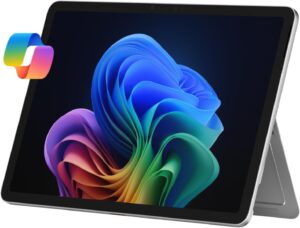
Microsoft Surface Pro 8 Review: The Microsoft Surface Pro 8 is one of the most powerful 2-in-1 laptops available today.The Microsoft Surface Pro 8 marked a major design refresh for Microsoft’s flagship 2-in-1 tablet-laptop hybrid when it launched. Positioned as a premium productivity device, it combines tablet portability with laptop-level performance and the flexibility of Windows 11. Unlike earlier incremental upgrades, the Pro 8 introduced a larger display, faster processors, Thunderbolt 4 support, and a more modern design language.
This deep review covers performance, display, battery, design, thermals, ports, real-world use, pros/cons, and whether it still makes sense to buy today.
The Surface Pro 8 retains Microsoft’s signature minimalist aesthetic but refines it. It uses an anodized aluminum casing available in Graphite or Platinum finishes and weighs about 891 g without the keyboard, making it extremely portable for a full PC.
The built-in kickstand remains one of the device’s best features, letting users angle the screen for typing, drawing, or watching content. Compared to older models, the Pro 8 feels more modern thanks to slimmer bezels and a slightly larger chassis that accommodates the bigger display.
However, premium design comes with trade-offs:
Keyboard and stylus are sold separately.
Port selection is limited.
Slightly heavier than older magnesium-body Surfaces.
Still, the build quality is top-tier, and durability is excellent for a device this thin.
The Pro 8’s 13-inch PixelSense Flow display is a major upgrade over previous generations. It features:
Resolution: 2880 × 1920
Pixel density: 267 PPI
Refresh rate: up to 120 Hz
The higher refresh rate makes scrolling, writing with a stylus, and UI animations noticeably smoother. A new ambient color sensor automatically adjusts tones based on lighting conditions, improving viewing comfort and color accuracy.
Brightness is strong, colors are vibrant, and sharpness is excellent for photo editing, document work, and media consumption. Compared with older Surface tablets, this display is widely considered one of the device’s biggest improvements.
TMicrosoft Surface Pro 8 Review covering design, performance, battery life, specs, pros, cons, and whether it’s worth buying in 2026.
he Surface Pro 8 runs on 11th-generation Intel Core i5 or i7 processors paired with Intel Iris Xe graphics.
Microsoft also increased processor power limits to around 23 W instead of 15 W, allowing higher sustained performance than the previous generation.
Typical benchmark scores include:
GeekBench 5: 1,288 single-core / 4,955 multi-core
Cinebench R23: 4,877
PCMark 10: 4,361
These results put it solidly in ultrabook territory. It’s fast enough for:
Office work and multitasking
Web browsing with many tabs
Photo editing
Light creative tasks
However, gaming performance is limited. For example, Civilization VI ran about 37 fps at 1080p in testing, showing it’s not intended as a gaming machine.
In real-world use, the Pro 8 excels at productivity workloads but struggles with heavy GPU-intensive tasks.
Microsoft Surface Pro 8 Review with full specs, benchmarks, battery test, pros, cons, and final verdict.Battery life is one of the most debated aspects of the Surface Pro 8. Microsoft advertises up to 16 hours, but real-world testing varies widely.
Independent reviews report:
~9 hours web browsing test
~8 hours 15 minutes PCMark test
~6 hours 32 minutes video playback
~7 hours mixed use with media + browsing
Refresh rate plays a major role: running at 120 Hz can reduce runtime by about 20 % or roughly an hour.
Overall, the battery is good for a thin tablet PC but not class-leading. It’s sufficient for a workday if settings are optimized, though power users may still need a charger nearby.
Microsoft redesigned the cooling system for the Pro 8, making it quieter and reducing fan usage compared to previous models.
Under normal productivity loads, the device remains silent most of the time. Fans ramp up only during demanding tasks like rendering or gaming. Thermals are generally well-managed, but sustained heavy workloads can warm the chassis.
Port selection is minimal but modern:
2× Thunderbolt 4 / USB-C
Surface Connect charging port
Headphone jack
Thunderbolt 4 support is a big upgrade because it enables:
External GPUs
Multiple displays
High-speed storage
However, Microsoft removed legacy ports like USB-A and the microSD slot, which some users may miss.
Wireless connectivity includes Wi-Fi 6 and Bluetooth 5.1, ensuring fast and stable connections.
For a tablet PC, camera quality is surprisingly good:
Rear camera: 10 MP
Front camera: 5 MP with Windows Hello facial recognition
The front camera is particularly strong for video conferencing, a feature increasingly important for remote work and meetings. Audio quality is also impressive, with clear microphones and loud speakers suitable for calls and media playback.
The Surface Pro 8 supports storage options from 128 GB up to 1 TB and includes a removable SSD located behind a rear flap.
While technically upgradeable, Microsoft recommends that SSD replacements be handled by technicians.
RAM options range from 8 GB to 32 GB, allowing buyers to choose configurations suited to light productivity or heavier multitasking.
Microsoft’s Signature Keyboard and Slim Pen 2 are optional accessories but essential for unlocking the device’s full potential.
Highlights:
Excellent typing feel
Haptic feedback stylus for drawing
Magnetic storage/charging for the pen (with compatible keyboard)
The stylus is especially appealing for artists, designers, and note-takers. The keyboard, however, is less stable on laps compared to traditional laptops, a common compromise with detachable designs.
Microsoft states that the device is repairable through out-of-warranty service programs and recycling initiatives.
The battery is rated to maintain about 80 % capacity after 500 charge cycles, which is typical for modern lithium-ion batteries.
It also meets ENERGY STAR requirements and carries an EPEAT Gold rating in certain regions, indicating good environmental standards.
Microsoft Surface Pro 8 Review: The Microsoft Surface Pro 8 is a premium 2-in-1 device designed for professionals, students, and creators.
Reddit discussions show a mix of praise and criticism from actual owners.
One user reported:
“120Hz feels great for scrolling and inking… performance is fast… never got too hot.”
However, others complained about battery life:
“5 hours is the most I can get… browsing and editing documents.”
Another user wrote:
“6-7 hours with light use… expected about 4 hours gaming.”
These experiences confirm what professional reviewers found: performance is strong, but battery life varies depending on settings and workload.
Gorgeous high-resolution 120 Hz display
Excellent build quality and portability
Fast performance for productivity
Thunderbolt 4 support
Strong webcam and audio
Expensive, especially with accessories
Keyboard and stylus not included
Battery life inconsistent
Limited port selection
Not suitable for gaming
This device is ideal for:
Professionals who need portability + power
Students who want a digital notebook + laptop
Creators who use stylus-based workflows
Business users working remotely
It’s less suitable for:
Gamers
Budget buyers
Users who need many built-in ports
The Microsoft Surface Pro 8 remains one of the best Windows-based detachable tablets ever made. It refined the Surface formula with a stunning display, modern internals, quieter cooling, and Thunderbolt 4 connectivity. Performance is strong for everyday tasks, and the design is as premium as ever.
Its main weakness is battery life, which rarely reaches Microsoft’s advertised figures and can drop significantly at higher refresh rates or heavier workloads. The cost also rises quickly once accessories are added.